Robot Shutdown
This article describes how to safely shut down the robot control program.
Shutdown via Handheld Controller
Robot in Whole-Body Mode
- Click the "Stand" button to make the robot enter a standing posture, facilitating hoisting.

- Use the transfer machine to lift the robot, raising it to a sufficient height where both feet are off the ground.
Note:
In Whole-Body Mode, before hoisting, ensure the robot is in a standing state. Hoisting in the walking state will cause the robot's lower limbs to be uncontrolled.
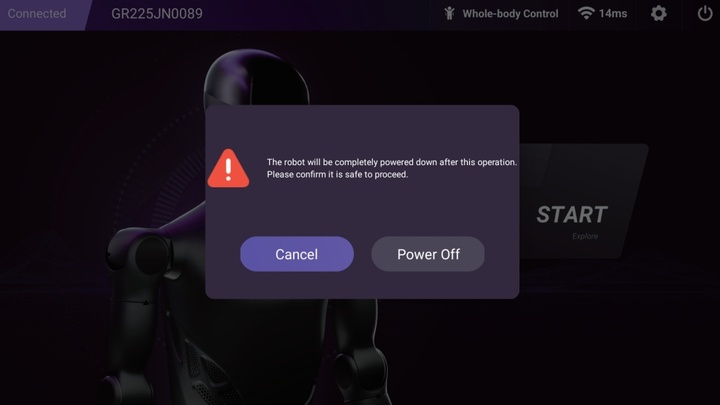
- Click the "Shutdown" button in the navigation bar of the handheld controller. The robot will power off entirely.
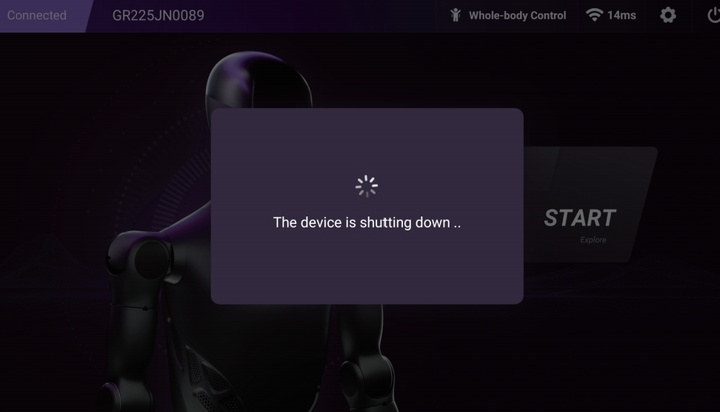
- After confirming shutdown, the robot will enter the shutdown state. The pop-up box will disappear upon successful shutdown, and the actuator lights will turn off.
Robot in Upper-Limb Mode
In Upper-Limb Mode, the robot is in a safe protection state, and the program can be closed directly.
- Click the "Shutdown" button in the navigation bar of the handheld controller. The robot will power off entirely.
- After confirming shutdown, the robot will enter the shutdown state. The pop-up box will disappear upon successful shutdown, and the actuator lights will turn off.
Manual Shutdown
Before manual shutdown, please activate the emergency stop and ensure the robot is in a safe protection state.
Normal Shutdown
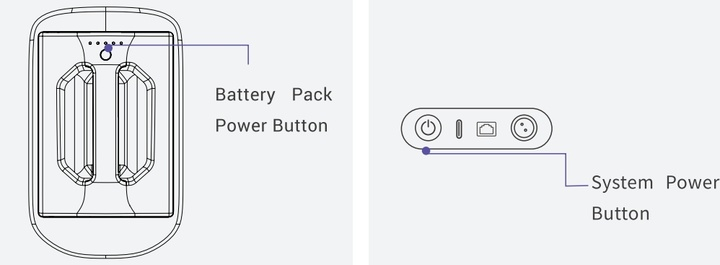
Press and hold the "System Power Button", wait for the "Yellow Light" to flash, then release the button immediately. The system will automatically shut down within 1 minute.
Force Shutdown
Press and hold the "Battery Pack" power button for 3 seconds, release the button, and the system will shut down immediately.